

This article aims to clear up the confusion by providing a detailed comparison of WebP, JPG, and AVIF, specifically in the context of Magento 2. We’ll explore how these formats differ in file size, image quality, browser compatibility, and overall impact on your Magento 2 store’s performance. By the end, you’ll have a clear understanding of which image format best suits your needs and how to implement it effectively for a faster, smoother shopping experience.
Comparing WebP, JPG, and AVIF for Magento 2 performance
File size comparison
One of the most important factors when choosing an image format for your Magento 2 store is file size. Smaller files load faster and reduce bandwidth consumption, which benefits both site speed and hosting costs.
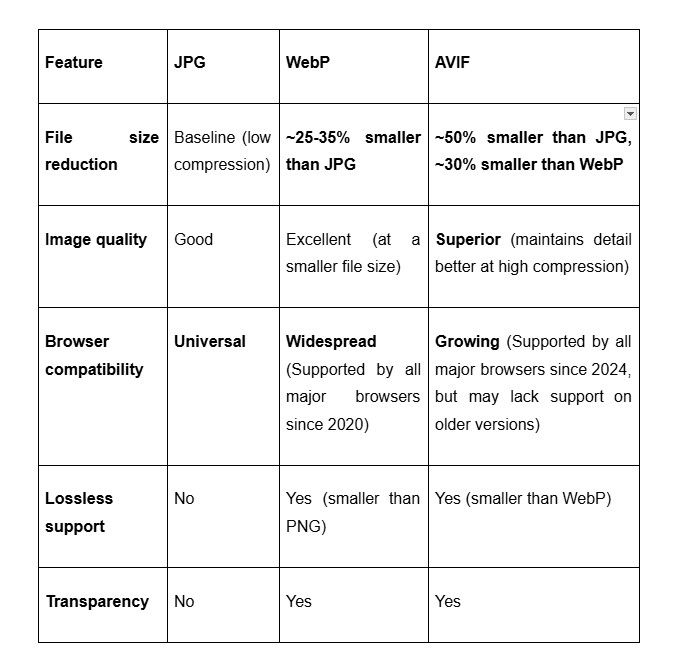
- JPG: Typically offers moderate compression, producing reasonably small file sizes with acceptable quality. However, for complex images, JPG files can be relatively large compared to newer formats.
- WebP: Usually reduces file size by 25-35% compared to JPG without noticeable loss in quality, making it a popular choice for faster loading pages.
- AVIF: Provides the best compression rates among the three, often 30-50% smaller than JPG and even smaller than WebP, all while maintaining excellent visual fidelity.
Smaller file sizes translate into lower bandwidth usage and reduced server load, which can lead to cost savings, especially for stores with high traffic or limited hosting resources.
Image quality comparison
While file size matters, maintaining high image quality is crucial for product presentation. Customers rely on clear, detailed images to evaluate products, especially in fashion, electronics, and other visual-centric categories.
- JPG: Delivers decent quality at moderate compression levels, but aggressive compression introduces visible artifacts such as blurring and color banding. This can degrade the shopping experience by making product images look less sharp or vibrant.
- WebP: Offers better compression efficiency than JPG, supporting both lossy and lossless modes. WebP maintains higher visual quality at smaller file sizes, reducing artifacts and preserving more detail, which improves user experience without increasing bandwidth.
- AVIF: Provides the most advanced compression technology among these formats, maintaining excellent sharpness, color accuracy, and fine detail even at very low file sizes. AVIF significantly outperforms JPG and WebP in quality retention, making it ideal for stores that prioritize image fidelity and performance.
Choosing the right format depends on your store’s specific needs, but leveraging WebP or AVIF can help you achieve a better balance between quality and compression, ultimately enhancing customer satisfaction and boosting conversions.
Loading speed and SEO impact
Image format choice directly affects page loading speed, which is a critical ranking factor for SEO and an essential part of the user experience on Magento 2 sites.
- WebP and AVIF: Thanks to their smaller file sizes, pages with these formats typically load faster. Faster loading times improve scores on tools like Google PageSpeed Insights and GTmetrix.
- JPG: While widely supported, its larger file sizes can slow down pages compared to WebP and AVIF.
Improved load speeds help reduce bounce rates and increase the time users spend on your site, which signals to search engines that your Magento 2 store provides a good user experience. Consequently, image optimization can boost your organic search rankings and drive more traffic.
For more ways to boost your store’s speed, check out our guide on Magento 2 performance tips every store owner should know.
Browser support and fallback implementation in Magento 2
Understanding browser support is critical to ensure all visitors see your images correctly.
- JPG: Universally supported on all browsers and devices—no fallback needed.
- WebP: Supported by most modern browsers, including Chrome, Firefox, Edge, and Android browsers. Some older browsers and Safari versions require fallback images.
- AVIF: Supported by the latest versions of Chrome, Firefox, and Edge, but still limited in Safari and many mobile browsers.
For Magento 2 stores, implementing fallbacks is essential. This can be done by:
- Using Magento 2 themes or custom code to serve WebP or AVIF images when supported, and default to JPG otherwise.
- Employing extensions that automate image format conversion and fallback management.
- Leveraging HTML picture elements with source tags specifying multiple formats for browsers to select the best supported one.
Proper fallback implementation ensures seamless image delivery, combining performance benefits with full compatibility across all user devices.
Direct comparison: JPG vs. WebP vs. AVIF
How to implement next-gen image formats in Magento 2
Native support
Out of the box, Magento 2 offers limited native support for next-generation image formats like WebP and AVIF. While store owners can configure Magento 2 to resize images automatically, the platform does not currently provide built-in tools to convert images to WebP or AVIF or to serve these formats conditionally based on browser support. This limitation means Magento 2 store owners need to rely on external solutions to fully leverage next-gen formats for improved performance.
The extension approach
Using a Magento 2 extension is the most popular and user-friendly way to implement WebP and AVIF images on your store. These extensions typically automate the process of converting your existing JPG and PNG images into next-gen formats and manage the delivery of appropriate image versions to your customers.
When choosing an extension, consider these important features:
- Automatic conversion: The extension should convert images to WebP and/or AVIF automatically when you upload or generate product images, reducing manual effort.
- Smart fallback strategy: A robust fallback mechanism is essential to ensure all browsers display images correctly. Ideally, the extension should attempt to serve AVIF first, then WebP, and finally JPG/PNG for unsupported browsers.
- <picture> tag generation: Automatically rewriting <img> tags to <picture> tags allows browsers to select the best supported image format seamlessly.
- Responsive images: Generating srcset attributes for different screen sizes ensures images are optimized for various devices, improving load speed and quality.
- Lazy loading: Ensuring images outside the viewport are not loaded until needed helps reduce initial page load times and bandwidth usage.
- Compatibility with full-page caching: Since Magento 2 often uses full-page caching (FPC) to speed up page delivery, the extension must work seamlessly with caching systems to avoid serving incorrect or broken images.
Using a reliable extension makes adopting next-generation image formats simple and accessible, even for merchants without deep technical expertise. A great example is the WebP Image extension Magento 2 from BSS Commerce — a trusted provider of Magento 2 extensions.This extension delivers automatic WebP conversion, smart fallback support, and responsive image capabilities, allowing store owners to boost site performance easily and efficiently.
BSS Commerce is built on three core principles: being solution-oriented, feature-rich, and transparent. With more than 10 years of experience in the Magento ecosystem, BSS Commerce truly understands merchants’ challenges and has developed over 150 Magento 2 extensions designed to enhance online stores and drive sales growth across multiple areas.
Server-side solutions
For advanced users or those with dedicated server access, server-side configurations offer another way to serve next-gen images efficiently. By setting up rules on the web server (Apache or nginx), you can detect the browser’s supported image formats via the HTTP Accept header and serve the best available format dynamically.
- Apache: Using mod_rewrite rules in .htaccess to check for WebP or AVIF support and serve the corresponding image version.
- nginx: Configuring conditional logic in the server block to deliver next-gen images when the browser supports them.
While powerful and flexible, these methods require technical expertise and careful testing to avoid conflicts with Magento’s caching layers or CDN configurations.
For a deeper dive into product image optimization, see Compressing and resizing product images in Magento: Step-by-step guide with clear instructions you can apply toda
Best practices for image delivery in Magento 2
Using responsive images (srcset) with modern formats
To ensure images load optimally on various devices, implement the srcset attribute alongside next-gen formats like WebP and AVIF. This allows browsers to select the most suitable image size and format based on screen resolution and device capabilities, balancing quality and performance.
Leveraging lazy loading and CDN for improved performance
Lazy loading delays the loading of images that are offscreen until the user scrolls near them, significantly reducing initial page load times and saving bandwidth. Magento 2 supports native lazy loading via the loading="lazy" attribute. Pairing this with a Content Delivery Network (CDN) helps serve images faster by caching them closer to users, reducing latency and server load.
Optimizing image dimensions and aspect ratios
Always use images that match the display size on the frontend to avoid unnecessary scaling in the browser. Properly sized images prevent wasted bandwidth and improve page speed. Maintaining consistent aspect ratios also helps avoid layout shifts, enhancing visual stability and user experience.
Compressing images without sacrificing quality
Use efficient compression tools or extensions that reduce file size while maintaining acceptable visual quality. Over-compressing can lead to artifacts that hurt user perception, while under-compressing wastes bandwidth.
Implementing caching and cache busting
Ensure your Magento 2 store leverages browser caching for images to avoid repeated downloads on return visits. Also, implement cache-busting strategies (e.g., appending version strings to image URLs) so updated images are properly refreshed without stale cache issues.
Using SVGs for simple graphics when appropriate
For logos, icons, and simple graphics, SVGs provide scalable, lightweight images that load quickly and look sharp on all devices. Incorporating SVGs where suitable can reduce the number of bitmap images needed.
Monitoring and testing with performance tools
Regularly audit your store’s image performance using tools like Google PageSpeed Insights, GTmetrix, or Lighthouse. These tools can identify slow-loading images, oversized files, or compatibility issues, helping you fine-tune delivery strategies.
Conclusion
Choosing the right image format plays a crucial role in optimizing your Magento 2 store’s performance and delivering a seamless shopping experience. While JPG remains widely supported and easy to use, next-gen formats like WebP and AVIF offer significant advantages in reducing file sizes and improving load speeds without compromising quality.
By understanding the differences between these formats and leveraging Magento 2 extensions—such as the WebP Images extension by BSS Commerce—you can automate image optimization, ensure broad browser compatibility with smart fallbacks, and implement responsive, lazy-loaded images to enhance both user experience and SEO.
Ultimately, adopting next-gen image formats combined with best practices in image delivery will help your Magento 2 store load faster, rank higher in search results, and convert more visitors into customers. Start implementing these strategies today to stay ahead in the competitive eCommerce landscape.